
In this article
- What is travel quotation software?
- Why the quote decides the booking
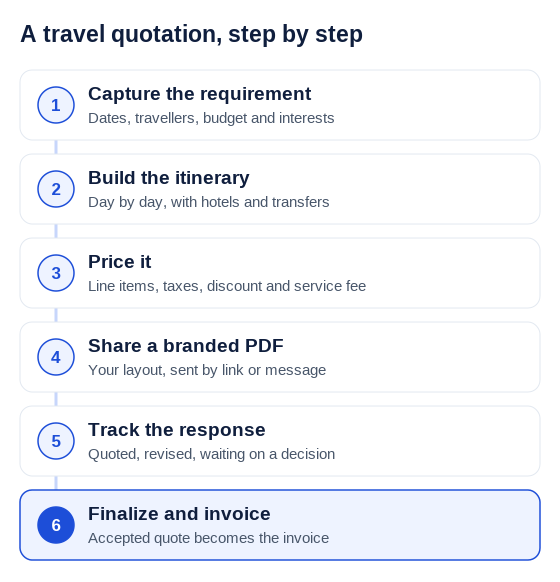
- 1. An itinerary builder, not just a price list
- 2. Clear pricing with taxes and discounts
- 3. PDF layouts that match your brand
- 4. Easy sharing
- 5. Quote tracking and versions
- 6. From accepted quote to invoice
- How the Ivonix Travel CRM handles quotations
- Start with one booking
What is travel quotation software?
Travel quotation software helps an agency turn an enquiry into a priced, branded offer: an itinerary with the hotels, transfers and activities, a price breakdown, and a document the customer can read on their phone. The good ones also tell you what happened next, so a quote doesn't disappear into a chat thread.
Why the quote decides the booking
A traveller comparing offers often judges an agency by how its quote looks and how fast it arrives. A quote rebuilt by hand from an old Word file takes hours, risks pricing mistakes and looks different every time. A quote built from a template, priced in the same system and sent within the hour looks organised, and customers tend to trust organised agencies.
1. An itinerary builder, not just a price list
Customers want to see the days, not only the total. Look for software that lets you add a day-by-day itinerary with cities, headings and descriptions, along with hotels and transfers, and then prices the whole trip. If the itinerary and the price live in two different files, they will drift apart.
2. Clear pricing with taxes and discounts
A quotation needs line items, the right taxes, a discount and a service fee, and it needs to total correctly every time. Check that you can choose the taxes yourself, such as CGST, SGST and IGST, and apply them to the services and to the service fee separately, so your team isn't calculating on the side.
3. PDF layouts that match your brand
The document is your shop window. Look for a choice of layouts and your own colours, from a plain classic format to photo-led brochures. The same layout should apply to the PDF and to the page the customer opens from a link.
4. Easy sharing
Your customers live on WhatsApp and email. The software should give you a link and a PDF you can send in either, without downloading and re-attaching files by hand.
5. Quote tracking and versions
You should always know where each quote stands: sent, revised, waiting on a decision or accepted. When a customer asks for a change, the new version should be saved next to the old one, so you know which one they saw.
6. From accepted quote to invoice
The step after a yes should not mean typing everything again. When the customer accepts, the finalized quotation should become the invoice, with the same line items, and the payment schedule should start from there.
How the Ivonix Travel CRM handles quotations
In the Ivonix Travel CRM, a quotation is built from the enquiry with an itinerary, hotels, transfers and a price breakdown with tax options. You choose from nine PDF layouts, share it by link, and track it through stages such as Quoted, Revised and Finalized. A finalized quotation becomes an invoice, and you can attach supplier costs to it to see your profit on the deal. The screens are on the travel CRM software page, and the itinerary builder page explains the day-by-day planning in more detail.
Start with one booking
You don't need to move the whole agency on day one. Take a real enquiry, build the itinerary and quote in the software, and compare the time and the result with your current way. If the quote is faster and looks better, the rest follows. You can ask for a walkthrough built around one of your own bookings.
Want this working in your business?
Tell us what you are working on and we will show you how it fits. No pressure, no jargon.