
In this article
- How is AI helping businesses grow?
- AI is a tool, not a strategy
- 1. Faster replies to every enquiry
- 2. First drafts of emails, quotes and proposals
- 3. Knowing which leads to call first
- 4. Quick summaries of calls, chats and documents
- 5. Marketing content that your team makes its own
- 6. Patterns in your numbers
- 7. Smarter apps and websites
- Where people still need to be in charge
- AI works best on organised data
- How to start without wasting money
- Building AI into your business tools
How is AI helping businesses grow?
AI helps businesses grow by taking on repetitive work that slows teams down: answering common questions, drafting emails and quotes, summarising calls and documents, and spotting patterns in sales data. Teams reply faster and spend more time with customers. It works best inside the tools you already use, with a person checking anything important.
AI is a tool, not a strategy
Much of the talk about AI focuses on what it might do one day. For a growing business, the useful question is simpler: which tasks take up your team's time every day, and could software do a first pass at them? Answer that, and AI stops being a buzzword and becomes a practical way to get more done with the same team.
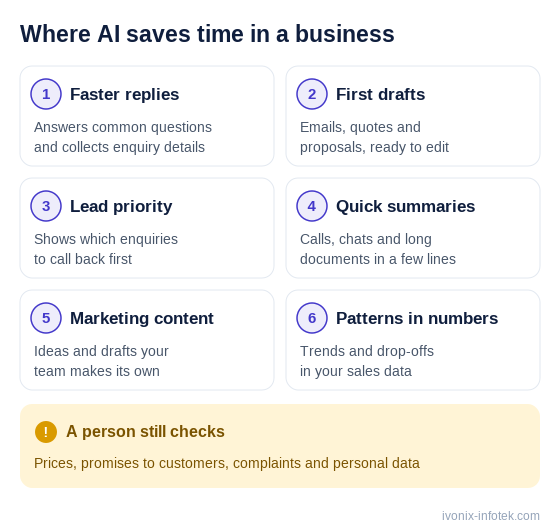
1. Faster replies to every enquiry
Customers often contact several businesses at once, and the one that replies first and clearly has a head start. An AI assistant on your website or messaging channel can answer common questions, such as what's included in a service or how to book, and collect the details your team needs. The enquiry then reaches a person with the basics already in place.
2. First drafts of emails, quotes and proposals
Writing the same kind of email or proposal again and again uses up hours. AI can produce a first draft from a few details, which your team then checks and personalises. In travel, for example, an AI itinerary builder can draft a day-by-day plan with pricing that an agent refines before sending. A person still decides what goes out, but they start from a draft instead of a blank page.
3. Knowing which leads to call first
When enquiries pile up, the best ones can wait too long. AI can look at the information in your CRM, such as where an enquiry came from, what the customer asked for and how they've responded so far, and suggest which leads are most likely to buy. Your team spends its first calls of the day where they're most likely to pay off.
4. Quick summaries of calls, chats and documents
Long email threads, chat histories and meeting notes take time to read. AI can summarise them in a few lines, so anyone picking up a customer can see what's been agreed, what's pending and what the customer cares about. Handovers between team members become much smoother.
5. Marketing content that your team makes its own
AI can suggest blog topics, draft social media posts and write product descriptions. Use it for ideas and first drafts, then add your own experience, examples and voice. Content that only repeats what's already online won't stand out with customers or search engines. Content shaped by people who know your business will.
6. Patterns in your numbers
Many owners have plenty of data but little time to study it. AI tools can point out trends and drop-offs, such as which services are growing, where enquiries stall, or which months need more marketing. You still make the decisions, but with a clearer picture.
7. Smarter apps and websites
AI also improves what customers see. Search that understands everyday language, recommendations based on what someone is browsing, and help that's available at any hour all make an app or website easier to use. Easier apps and websites bring more enquiries and more repeat customers.
Where people still need to be in charge
AI can be confidently wrong. It can quote a price that doesn't exist, promise something you don't offer or misread a customer's tone. Keep a person responsible for prices, commitments to customers, complaints and anything involving personal data. Be careful about which customer information you send to outside AI tools, and check how each tool stores it.
AI works best on organised data
AI can only work with the information it's given. If your enquiries live in WhatsApp chats, your bookings in spreadsheets and your customer history in someone's memory, there's little for AI to work with. When everything sits in one system, such as a CRM, AI can draft replies, suggest next steps and summarise a customer's history. That's why the first step for many businesses isn't an AI tool at all. It's getting their leads, customers and sales into one place.
How to start without wasting money
Pick one repetitive task that takes real time each week, such as replying to common enquiries or drafting quotes. Try AI on that task alone, with a person checking every output at first. Compare the time it takes before and after, and only then roll it out further. Small, measured steps beat a big project that nobody uses.
Building AI into your business tools
We build custom CRMs, mobile apps and websites for growing businesses, and our Travel CRM includes an AI itinerary builder that drafts day-by-day plans with pricing. If you're planning a new system, tell us which tasks take up your team's day, and we'll suggest where automation or AI could help.
Want this working in your business?
Tell us what you are working on and we will show you how it fits. No pressure, no jargon.