
In this article
- What is travel lead management software?
- Where agencies lose enquiries
- 1. Capture every enquiry in one place
- 2. Assign an owner at once
- 3. Move leads through clear stages
- 4. Set the next follow-up
- 5. Quote from the lead, not from scratch
- 6. Record why a lead was lost
- What to look for before you choose
- How the Ivonix Travel CRM handles leads
- Start with the follow-ups
What is travel lead management software?
Travel lead management software gives every enquiry a home. Instead of leads scattered across phone notes, chats and email, each one is recorded in a single grid with an owner, a status and a next step. It is the part of a travel CRM that answers one question every morning: who needs a reply today?
Where agencies lose enquiries
Most lost bookings are not lost on price. They are lost to silence. An enquiry arrives on a busy afternoon, nobody is assigned, the quote goes out two days later, and the customer has already booked elsewhere. The same pattern repeats with follow-ups: a customer says "let me think", and nobody calls back because nobody was reminded.
1. Capture every enquiry in one place
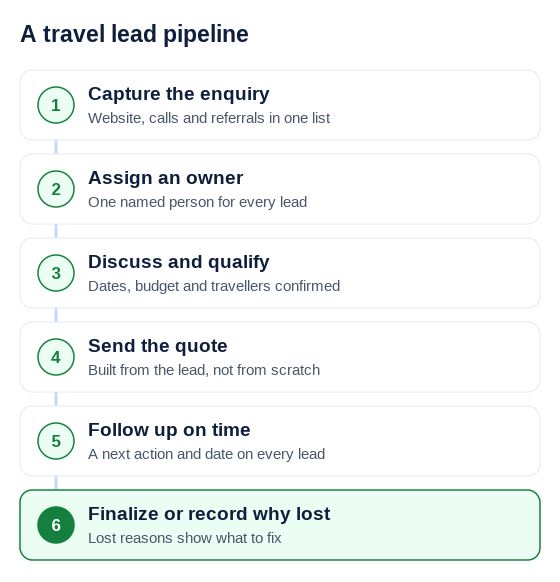
Leads come from your website form, calls, social media and referrals. The first job of the software is to put all of them in one list, with the source, the destination, the dates and the number of travellers. If a lead isn't in the list, it doesn't exist.
2. Assign an owner at once
Each lead needs one named person. Look for software that lets an admin allocate leads to team members, so no enquiry sits unclaimed and nobody is unsure whose turn it is to reply.
3. Move leads through clear stages
A simple set of stages keeps the whole team honest: a new lead, in discussion, quoted, follow-up, finalized or lost. When the stages are the same for everyone, the admin can see at a glance how many enquiries are waiting at each step.
4. Set the next follow-up
Every lead should always have a next action and a date. The follow-up list for today then becomes the team's to-do list, and the "let me think" customers get a call at the right time instead of never.
5. Quote from the lead, not from scratch
The quotation should be built from the enquiry, so the destination, dates and travellers are already filled in. This saves time and prevents mistakes, and the quote stays linked to the lead's history.
6. Record why a lead was lost
Lost leads are information. If many are lost on price, or on slow replies, you can see it and fix it. Without a recorded reason you are guessing.
What to look for before you choose
Check that the lead grid can be filtered by owner, stage, source and date. Check that an admin can see everyone's leads while a team member sees only their own if you want it that way. And check that it works on a phone, because your team will answer enquiries away from their desks.
How the Ivonix Travel CRM handles leads
In the Ivonix Travel CRM, enquiries appear in a lead grid where an admin can allocate them to team members and move them through follow-up stages. A quotation is created from the lead, and a finalized quotation becomes the invoice. The screens are on the travel CRM software page, and the broader case for replacing spreadsheets is in signs you've outgrown spreadsheets.
Start with the follow-ups
If you change one thing this week, track the next follow-up date on every open enquiry. It costs nothing, and it is the habit that recovers the most lost bookings. When you are ready to put it in software, you can ask for a walkthrough.
Want this working in your business?
Tell us what you are working on and we will show you how it fits. No pressure, no jargon.